Staking on Kraken creates rows that look like a withdrawal and a deposit. Cryptotax links them by itself, so your purchase price and purchase date carry over. Don't mark them as Self-transfer.
When you stake crypto on Kraken, rows show up in your overview that look like a withdrawal and a deposit. They aren't: your coins never leave Kraken. This guide explains which rows belong to staking, what Cryptotax does with them automatically and why you don't need to mark them as Self-transfer.
What you see when you stake on Kraken
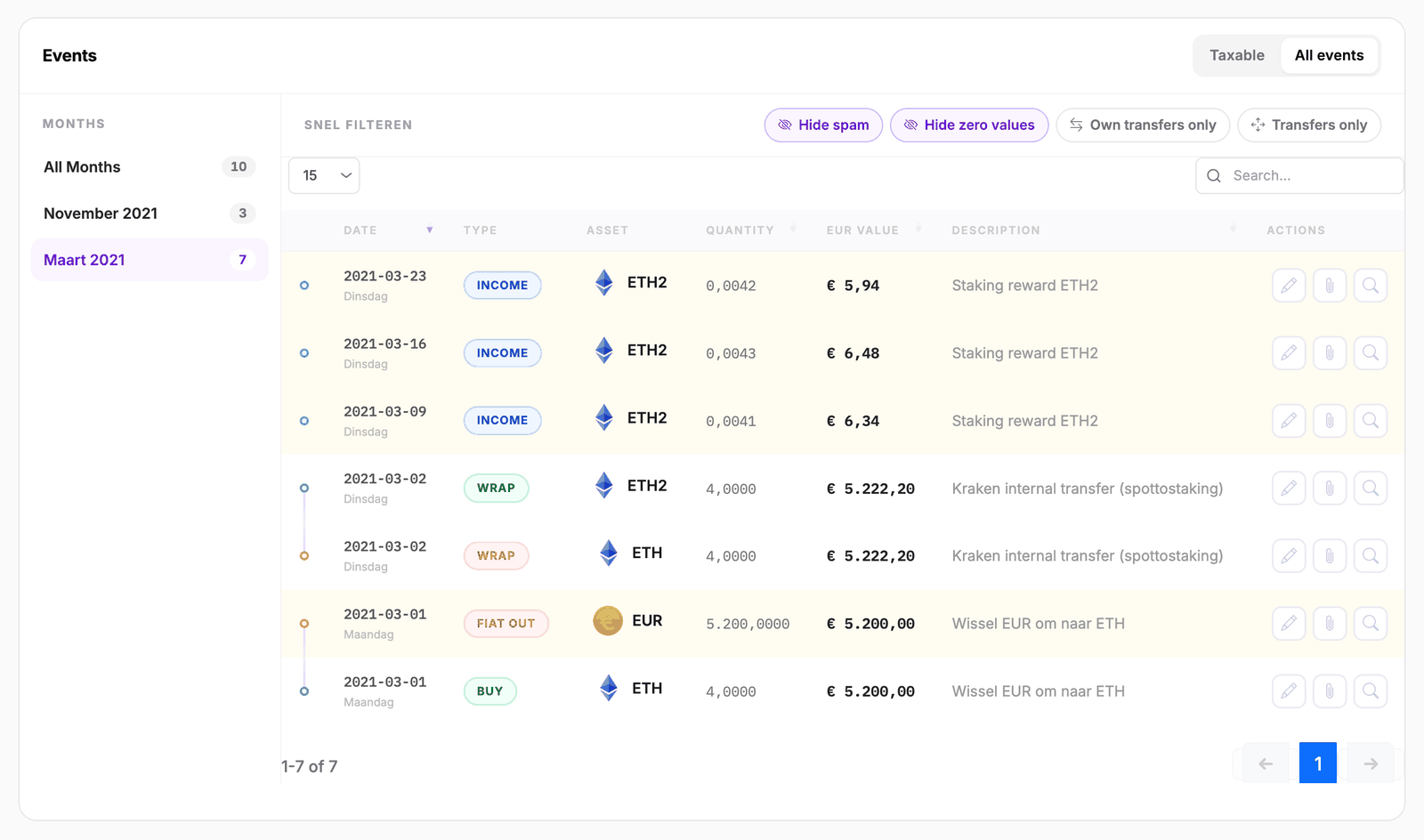
Kraken records staking in your export as two rows at the same moment:
- a row where the coin leaves your regular balance, for example 4 ETH;
- a row where the same amount appears in your staking balance, often under a slightly different name, for example 4 ETH2.S.
When you take your coins out of staking later, the same thing happens in the other direction. The rewards you receive in the meantime sit in between as separate rows.
Cryptotax recognises those two rows as one movement and links them to each other. In the All events tab of the tax year they show with the type WRAP (into staking) or UNWRAP (back out of staking), not taxable. The staked variant is listed as ETH2. Rewards have the type INCOME.
What Cryptotax does automatically
Because the two rows are linked, Cryptotax treats staking neither as a sale nor as a new purchase:
- Your purchase price carries over. If you bought 4 ETH for € 5,200, your 4 staked ETH still have a cost basis of € 5,200.
- Your purchase date carries over. The holding period doesn't start again.
- No capital gain arises at the moment you enter or leave staking.
So there's nothing you need to do here.
Staking rewards are something else
The rewards themselves are separate rows. Cryptotax books each reward as a receipt at the market value of that moment. That value immediately becomes the cost basis of those coins for a later sale. Read more about how staking is taxed in Belgium in our explanation of staking and taxes.
Don't mark these rows as Self-transfer
It's tempting to mark every row that looks like a withdrawal or a deposit as Self-transfer. For staking rows that isn't needed and it would even hurt: the link between the two rows already makes your purchase price carry over. A Self-transfer would break that link.
That's why you can't pick Self-transfer for these rows. When you open Adjust treatment with the pencil, that choice is greyed out and you can't click it. Hover over it to read why:
This movement is already linked to its counterpart; the cost basis already carries over.
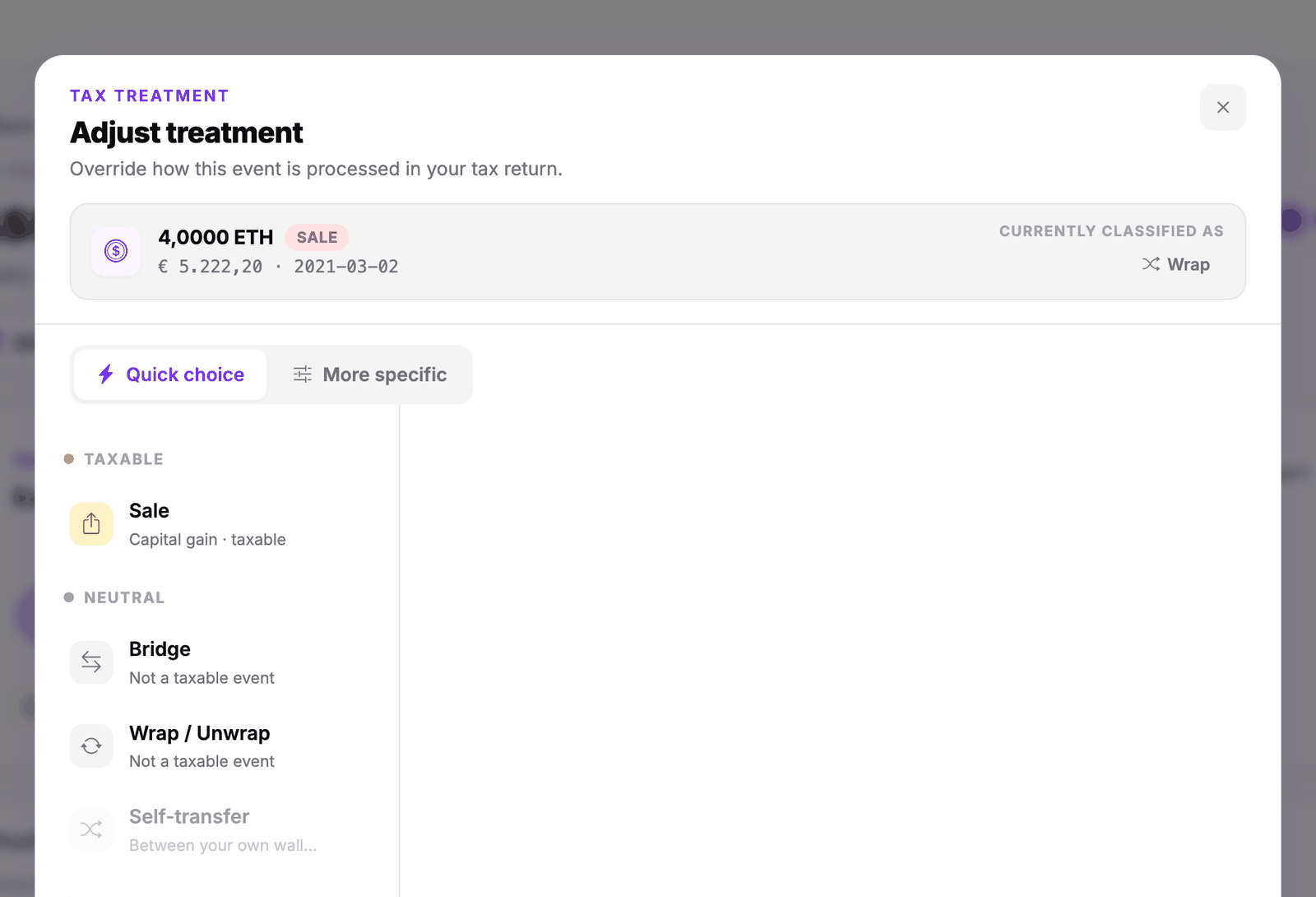
The same rule applies to other movements Cryptotax already linked by itself, such as a bridge or a wrap.
When do you use Self-transfer?
Self-transfer is meant for coins that really leave or enter Kraken, from or to a wallet or platform that belongs to you:
| What you see | What you do |
|---|---|
| Two rows at the same moment, ETH out and ETH2 in (staking) | Nothing. Cryptotax links them by itself. |
| A staking reward | Nothing. Cryptotax books it as a receipt. |
| A withdrawal to your Ledger, Trezor or another wallet of your own | Mark as Self-transfer. |
| A deposit from your own wallet | Mark as Self-transfer. |
The step-by-step instructions are in Crypto to your own wallet and back.
Frequently asked questions
I already marked my staking rows as Self-transfer in the past. Do I need to do anything?
No. Cryptotax ignores that choice for rows that are already linked and calculates with the link. Your purchase price and purchase date simply carry over. If you want to tidy up your list, open the row with the pencil and click Delete override at the bottom.
I only see one of the two rows
That happens when Kraken doesn't put the counterpart in your export. When such a row comes back from staking, Cryptotax books it as an internal, non-taxable movement. If there's a row you can't place, check that your full Kraken history has been imported. How to do that is explained in How to connect Kraken.
My cost basis after staking looks wrong
Check the other causes in My cost basis looks wrong.