Moved your crypto to a wallet of your own, like a Ledger, and sent it back later? Mark both sides as Self-transfer so your coins keep their purchase price and purchase date.
Many people move their crypto from an exchange to a wallet of their own, such as a Ledger or Trezor, and later send it back to sell. For tax purposes that round trip is neither a sale nor a new purchase: they are the same coins, with the same purchase price and the same purchase date. This guide explains how to tell Cryptotax and how to check afterwards that the calculation is right.
Why this matters
If you don't connect that wallet to Cryptotax, Cryptotax only sees the two sides on the exchange: a withdrawal where coins disappear, and years later a deposit where coins appear. Without more information, that deposit looks like a new purchase. The coins then get the market value on the day of the deposit as their cost basis, and their holding period starts again. Your gain on a later sale is then wrong: usually too low, and sometimes a loss shows up that never happened.
How to mark it
You mark both sides as Self-transfer. Cryptotax then remembers which coins left for your own offline wallet, with their original cost basis and purchase date. When coins come back later, Cryptotax takes back the oldest coins that left first (FIFO) and gives the deposit their cost basis and purchase date.
- Open the tax year of the withdrawal and choose the All events tab. Find the withdrawal, for example by typing the coin in the search field.
- Click the pencil (Adjust treatment), choose Self-transfer and click Save.
- Wait for the recalculation to finish. Then open the tax year of the deposit and do the same for the deposit. For a deposit, Self-transfer is listed under Neutral; scroll the list a little.
- For the deposit, leave Original purchase date and Original cost basis empty. If you do fill them in, Cryptotax uses your values instead of the earlier withdrawals.
Note: the automatic pairing works when you send the coins back to the same platform they left from, for example from Kraken to your Ledger and back to Kraken. If you deposit them on a different platform, mark the deposit as Self-transfer too and fill in the original purchase date and cost basis yourself.
If you did connect the wallet itself to Cryptotax, Cryptotax sees both sides of every transfer and can link them. This guide is for wallets you don't connect.
Worked example
Say you did this on a single exchange:
- 10/01/2018: you buy 2 BTC at € 12,000 per BTC (€ 24,000).
- 01/06/2018: you buy 0.5 BTC at € 6,000 per BTC (€ 3,000).
- 01/05/2019: you move 2.5 BTC to your Ledger.
- 05/03/2024: you send 3 BTC back to the exchange. BTC is at about € 62,862 at that point.
- 01/06/2025: you sell 1 BTC for € 60,000.
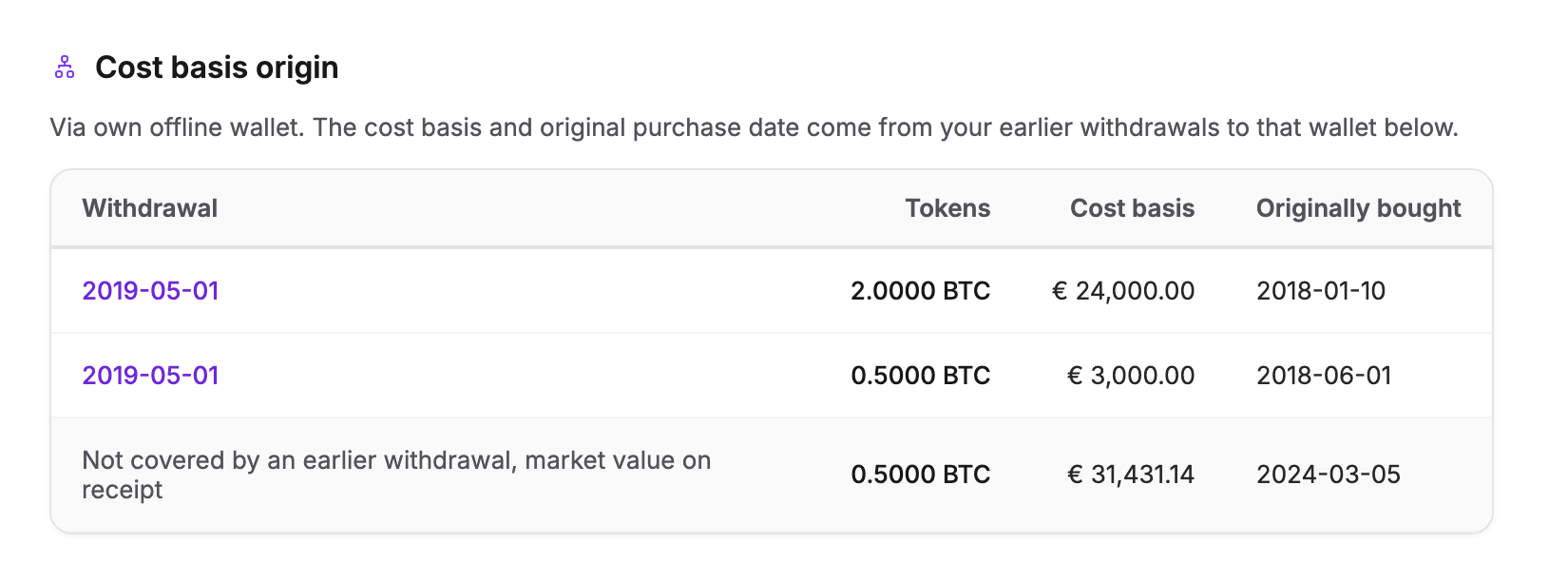
0.5 BTC more comes back than left. That 0.5 BTC has no earlier withdrawal as its origin, so Cryptotax values that part at market value on receipt (€ 31,431.14).
| Without Self-transfer | With Self-transfer | |
|---|---|---|
| Cost basis of the 3 BTC sent back | € 188,586.87 (market value at deposit) | € 24,000 + € 3,000 + € 31,431.14 = € 58,431.14 |
| Cost basis of the 1 BTC sold | € 62,862.29 | € 19,477.05 |
| Result of the sale | loss of € 2,862.29 | gain of € 40,522.95 |
| Purchase date | 05/03/2024 | 10/01/2018 |
The loss in the first column isn't real: it only appears because Cryptotax saw the return of your own coins as a new, expensive purchase. Whether and how the gain is taxed depends on your situation. Read more in our explanation of cost basis and FIFO.
Check the sale
Open the sale with the magnifying glass in the tax year. Under every lot it used, you now see where it came from: via your own offline wallet, when it was sent back and when it was originally bought. That's why the date in the table is the original purchase date, not the date of the deposit.
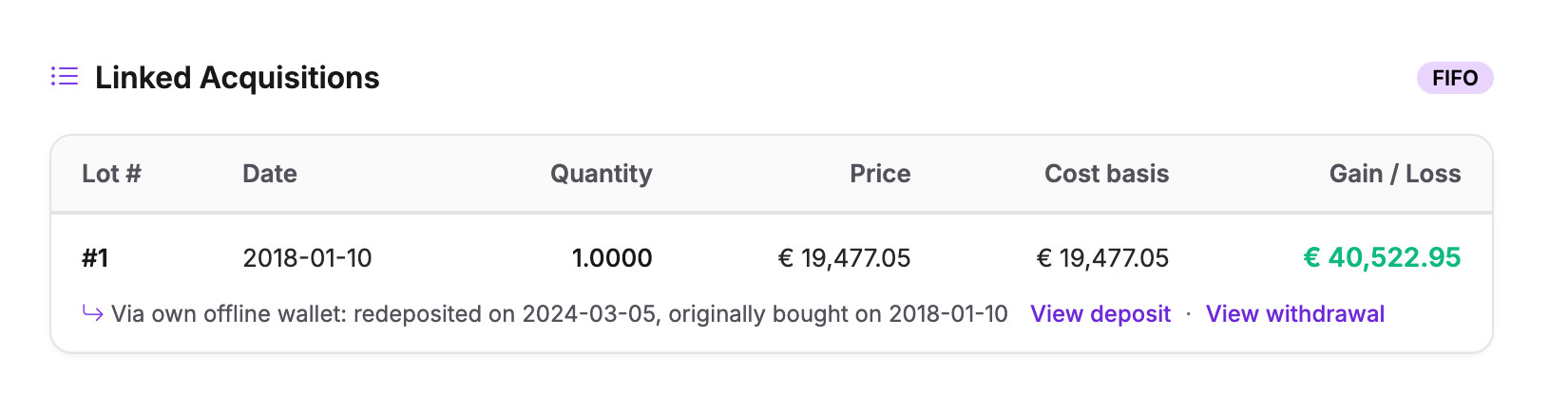
View deposit opens the deposit, View withdrawal the withdrawal to your wallet.
Check the deposit
In the deposit's details, the Cost basis origin block shows which withdrawals the cost basis comes from: per withdrawal the amount, the cost basis and the original purchase date. If more came back than left, you also see that remainder, valued at market value on receipt.
Once you have marked transfers as Self-transfer, the tax year dashboard also shows the Your own offline wallets card, with an estimate of what your transfers say is still in your own wallets.
In your report
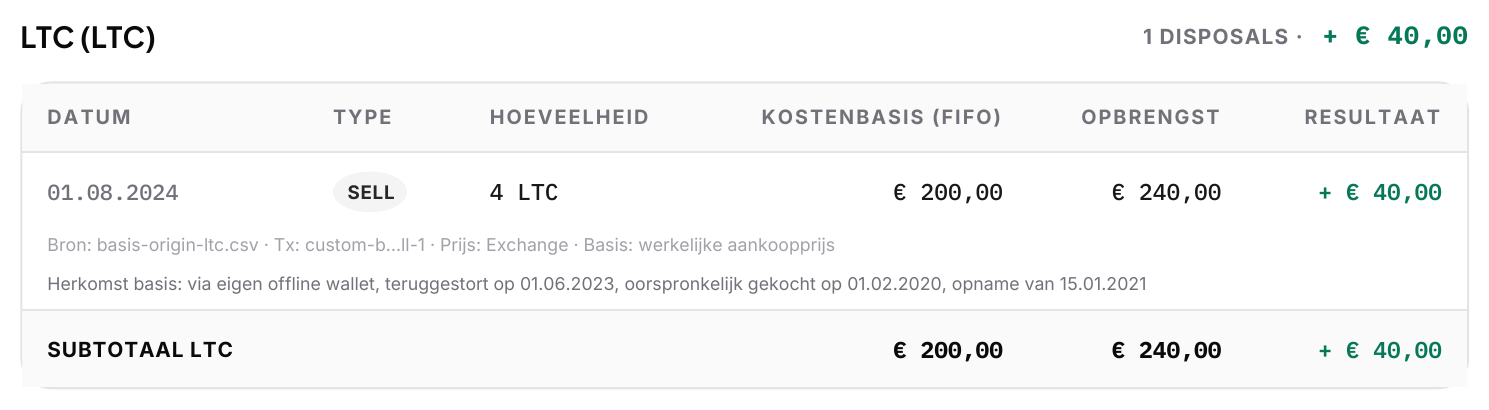
The detailed report shows the same explanation under every sale that used such coins. That way your accountant or the tax authority can follow the whole chain: when the coins were bought, when they went to your wallet and when they came back. The report itself is in Dutch.
Frequently asked questions
I sent my coins back in several goes
No problem. Each deposit takes over the oldest coins that haven't come back yet, until none are left. Mark every withdrawal and every deposit as Self-transfer.
Less came back than left
Then the rest stays in your own offline wallet, with its original cost basis and purchase date. If you send it back later, it's taken over the same way.
My cost basis still looks wrong
Check the other causes in My cost basis looks wrong. Often a purchase is missing, for example on an exchange that isn't connected yet.