Was your crypto in a wallet of your own, such as a Ledger, on 31 December 2025? This is how Cryptotax works out that balance, what to check, and which value a sale from 2026 gets.
Did you hold crypto on 31 December 2025 in a wallet of your own that you did not connect to Cryptotax, such as a Ledger or Trezor? Then it counts in the snapshot of that date, as long as you marked the withdrawals to that wallet as Self-transfer. This guide explains how Cryptotax works out that balance, what to check, and which value a sale from 2026 onwards gets. All amounts in Cryptotax are an indicative calculation based on the data you provide.
The snapshot in short
For crypto you already held before 1 January 2026, the capital gains calculation starts by default from the market value on 31 December 2025. What that rule means is explained in our article on the step-up rule and in the overview Crypto taxes in Belgium 2026. This guide only covers how coins in a wallet you did not connect count in it.
How Cryptotax knows what was in your wallet
Cryptotax cannot look inside a wallet you did not connect. The balance is therefore derived from what you told it:
- every withdrawal you marked as Self-transfer counts as coins that left for your own wallet;
- every deposit you marked as Self-transfer counts as coins that came back.
What left up to and including 31/12/2025 and had not come back yet is your offline balance on the snapshot date. How to mark transfers is explained in Crypto to your own wallet and back.
You find that balance on the dashboard of tax year 2025, in the card Your own offline wallets, column On 31/12/2025. The column Now (estimated) shows what is still in your wallet today according to your transfers.

Cryptotax values that balance at the market price of 31/12/2025, just like the coins on your connected accounts. In the All events tab of 2025 you see two rows per coin on 31/12/2025 for this, a sale and a purchase for the same quantity and value. They are not real transactions and they are not taxable: they only record the value on the snapshot date.
What to check
For each coin, compare the number in the column On 31/12/2025 with what was really in your wallet that day. With a block explorer you can look up what was on your wallet address that day.
If it differs, this is usually why:
- A withdrawal is missing. The exchange the coins left from is not connected, or the CSV file starts too late. Add the missing source.
- A withdrawal is not marked. A withdrawal that is not marked as Self-transfer does not count. The Own transfers only filter in the All events tab shows what you have already marked.
- You sold or spent coins from the wallet. Cryptotax does not see what happens inside a wallet you did not connect. The balance on the card is then too high. Connect the wallet if its blockchain is supported (see How to connect a wallet), so those transactions count.
- You deposited the coins on a different platform before 31/12/2025. Cryptotax only pairs a deposit with your wallet automatically when it arrives on the same platform the coins left from. If they came back on a different platform, they are still counted as offline today and the balance on the card is too high. In that case, please contact us.
- Coins arrived in the wallet that did not come from your own accounts. Cryptotax does not know about those. The balance on the card is then too low (see the frequently asked questions).
The offline balance is an estimate based on your own marks. So keep your own proof that you held the coins on 31/12/2025, for example the public address of the wallet.
Depositing and selling from 2026
If you send the coins back from 2026 onwards and mark the deposit as Self-transfer, the deposit takes over the oldest coins from your offline wallet, with their original purchase date. If you then sell them, Cryptotax by default uses the value on 31/12/2025 for coins that were in your wallet on the snapshot date, not the old purchase price.
An example:
- 20/06/2022: you buy 1.5 BTC at € 19,000 per BTC.
- 10/01/2023: you move 1.5 BTC to your Ledger (Self-transfer).
- 31/12/2025: the 1.5 BTC is in your wallet. The market price that day is € 74,354.81 per BTC.
- 02/03/2026: you send 1 BTC back (Self-transfer).
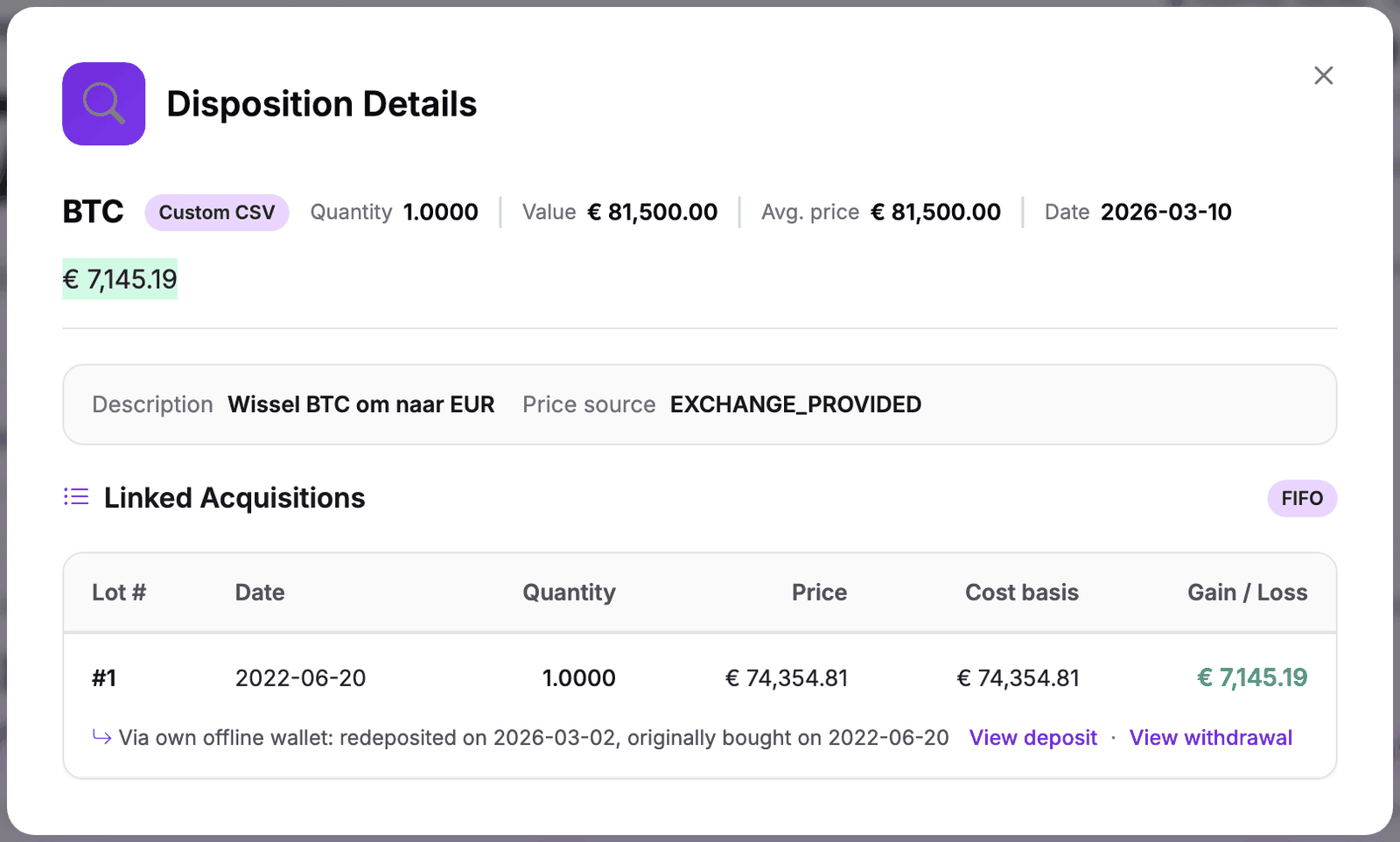
- 10/03/2026: you sell 1 BTC for € 81,500.
Open the sale with the magnifying glass in tax year 2026. The table of lots used shows the original purchase date (20/06/2022), but the columns Price and Cost basis show the value on 31/12/2025: € 74,354.81. The gain in this example is € 81,500 − € 74,354.81 = € 7,145.19. The line below it shows that the coins came via your own offline wallet.
Good to know:
- In the detail of the deposit, the block Cost basis origin still shows the original cost of the coins (here € 19,000). The value used in the calculation is shown on the sale.
- The value on 31/12/2025 is the default. If you choose your actual acquisition value for a coin in Cryptotax (page Pre-2026 cost basis election, see our article on unrealised losses), the coins from your offline wallet count in that average. If your profile is set to speculative, Cryptotax uses the average actual purchase price from before 2026. Which choice fits your situation is best discussed with your accountant.
- If a 2026 sale still shows the old purchase price, click Sync all under Wallets and wait for the recalculation to finish.
A deposit with coins from before and after the snapshot
If you also moved coins bought in 2026 to your wallet, a single deposit can contain coins from both sides of the snapshot date. Cryptotax then splits that deposit into two lots:
- the part that was already in your wallet on 31/12/2025, with the value on 31/12/2025;
- the part you bought in 2026, with its actual purchase price and purchase date.
Example: on 20/01/2026 you buy another 0.5 BTC at € 76,000 per BTC, move it to your Ledger and later send 1.75 BTC back. On the sale you then see a lot of 1.5 BTC at € 74,354.81 per BTC and a lot of 0.25 BTC at € 76,000 per BTC.
Where to find it as proof
The snapshot certificate lists the offline part separately. The certificate is in Dutch: in the column Hoeveelheid (quantity) it says "waarvan … offline" (of which … offline) below the total, with a footnote stating that this part is an estimate based on your own marks and cannot be verified through the connected accounts. The CSV annex gets the column offline_quantity for it.
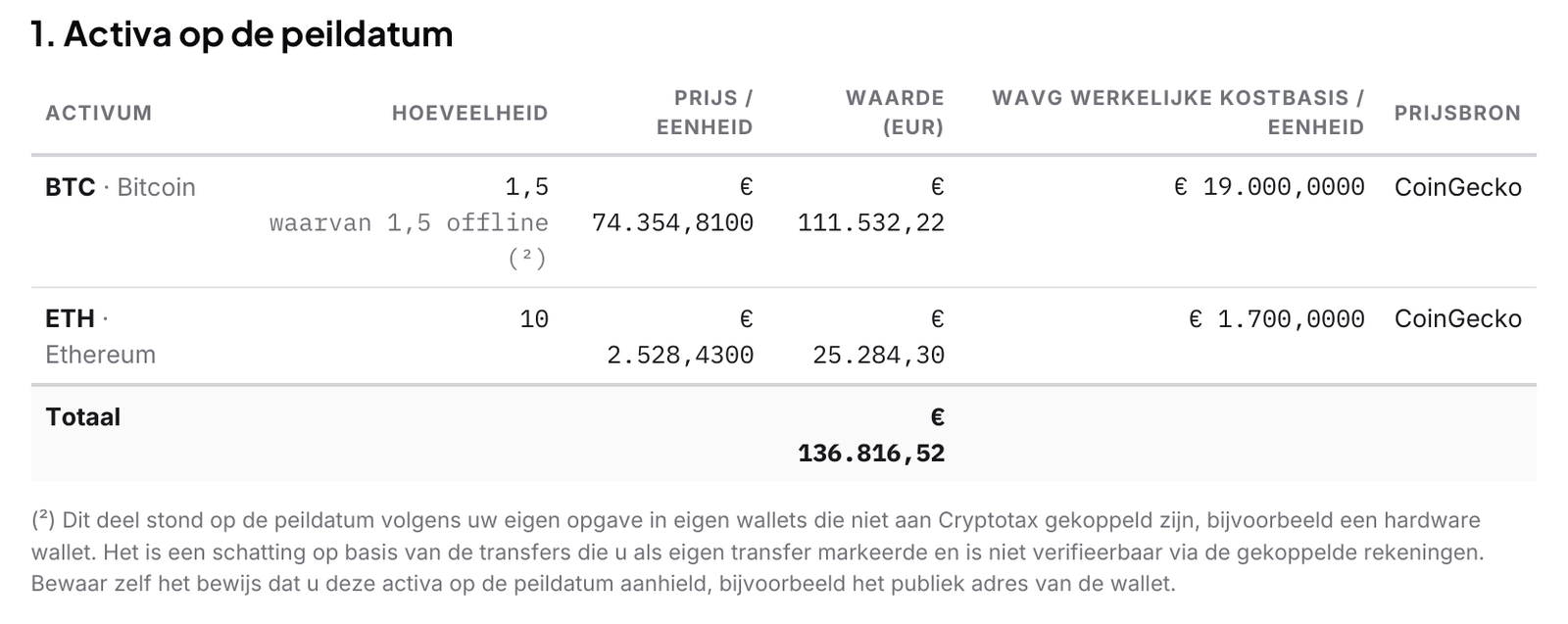
In the detailed report, every sale that used such coins shows the origin via your own offline wallet, with the date of the deposit and the original purchase date.
If you only marked the withdrawals after you had created a certificate, generate it again. Earlier versions are kept.
Frequently asked questions
I connected the wallet after all
Then Cryptotax sees the coins on the wallet itself and they count there on the snapshot date. A withdrawal that Cryptotax links to the receipt on your connected wallet no longer counts as offline. After connecting, check the card Your own offline wallets: if it still shows a balance that is now also on the connected wallet, please contact us so the coins are not counted twice.
I moved coins between two wallets of my own
If neither wallet is connected, nothing changes: Cryptotax counts per coin what left for your own wallets and what came back, whichever wallet the coins are in.
I received coins in my wallet from someone else
Coins that arrived directly in your wallet, for example a gift, a payment or a purchase on a platform that is not connected, are not in the offline balance and so are not in the snapshot in Cryptotax. If you later deposit them on an exchange, the card says "Received more than previously sent" and those coins get the market value at receipt as their cost. If you want them to count, connect the wallet or add the missing source.
The card shows 0 in the column On 31/12/2025
Then, according to your marks, nothing left before 2026, or everything was already back on that date. Check that the withdrawals from before 2026 are marked as Self-transfer. The card only appears once you have marked at least one transfer that way.